

Your first 90 days with AI, in order
An AI implementation plan for a small business fits in 90 days: a month of drafting, a month building one automation, and a month deciding what comes next.
Choose the Mini AI Assessment when you book the free 30-minute Discovery Call. We’ll identify one time sink and show you the tool or next step most likely to fix it. No pitch, no obligation.
Practical, no-hype notes on AI and automation for Cork and Munster businesses: what it actually costs, which jobs to hand over first, and how to use these tools without getting burned. Plain English, written for busy owners.
An AI implementation plan for a small business fits in 90 days: a month of drafting, a month building one automation, and a month deciding what comes next.
AI for quantity surveyors in Ireland pays for itself on the paperwork around the numbers: tender documents, valuation write-ups and the letters in between.
Disclose AI to customers when they’re talking to it, when it made something they’d assume a person made, or when it decides something about them.
AI training for staff can fit into one hour if you teach four things: what to use it for, how to ask, what never goes in, and how to check what comes out.
When AI makes a mistake in front of a customer, treat it as your own mistake: correct it quickly and in person, then put a human check where it slipped through.
To make AI writing sound human, give the tool a few samples of your own writing to copy, then delete the stock phrases and tidy patterns that give it away.
Who owns AI-generated content? For an Irish business, you can usually use it as your own, but the legal protection around it is thinner than for work a person wrote.
AI for architects and engineering practices in Ireland earns its keep on the writing around the design: specifications, planning correspondence and fee proposals.
AI for insurance brokers in Ireland earns its keep on the admin wrapped around the advice: chasing renewals before they lapse, writing up why one quote was recommended over another, and keeping a file that stands up to a compliance review.
AI for charities in Ireland earns its place on the admin: funding applications drafted, donor thank-yous written properly, and the reporting pack assembled without losing a weekend to it.
AI for childcare providers belongs on the paperwork, not the children: parent messages drafted, enrolment enquiries answered, and the policy folder made findable again.
AI for farming in Ireland earns its keep in the office, not the yard: scheme paperwork drafted, farm records made findable, and correspondence answered before ten at night.
AI for plumbers and electricians earns its keep on the paperwork, not the pipework: quotes drafted from a voice note, follow-ups chased, cert records kept findable.
AI features in existing software are the cheapest AI you will ever use, and your Microsoft or Google plan, CRM and accounts package probably include some already.
An AI policy for a small business fits on one page: which tools staff may use, what never gets pasted in, who checks the output, and who to ask.
AI for driving instructors is mostly a diary problem: cancellations, rescheduling, reminders and the messages you end up answering at the kerb between lessons.
AI for salon booking earns its keep on three things: no-shows, rebooking, and answering the phone while both your hands are in someone’s hair.
AI for a veterinary practice is best pointed at the admin, not the medicine: vaccination recalls, appointment reminders, and the phone that rings mid-consult.
An AI agent is a tool that carries out a job on its own rather than waiting for you to ask, deciding the steps itself and using your systems to get it done. Most small businesses do not need one yet, and the ones that do usually need exactly one.
AI pays for itself fastest in a recruitment agency on the writing and the follow-up, not on deciding who gets shortlisted. Job specs, candidate summaries, interview notes and the chase that keeps a placement alive are all repetitive, high-volume, and safe to hand over. Screening decisions are not.
AI earns its place in an Irish pharmacy on the counter admin and the phone, not anywhere near clinical judgement or the dispensing process. The wins are the repeat-prescription chase, the same twenty questions asked every day, and the paperwork that piles up behind the dispensary.
Most useful AI automation for a small business is working within days, not months. A drafting habit takes an afternoon, a single automation that runs by itself usually takes one to three weeks, and anything quoted in quarters is either much bigger than you need or badly scoped.
AI for a gym or fitness studio is most useful on the admin around the training, not the coaching: bookings, no-shows, lapsed members and the weekly content.
No business is too small for AI, but plenty are too small for the version of it being sold to them. If you are one person with a phone and a spreadsheet, the useful question is not whether to adopt AI, it is which single job in your week you would hand over first.
An AI course teaches you to use the tools; an AI consultant works out which jobs in your business are worth handing to them. Most owners need the second thing first, then the first thing to stick.
Real AI automation examples for a small business are duller and more specific than the hype suggests: a quote drafted from site notes, an inbox sorted before you open it, an invoice chased on day seven, a Monday report that writes itself.
AI for a construction small business earns its keep on the paperwork, not the building: drafting quotes, writing up site records, and chasing the documents and payments that quietly stall a job.
AI for estate agents in Ireland earns its place on the admin that eats a viewing day: drafting listing copy, chasing enquiries before they go cold, and turning scribbled viewing notes into follow-ups you would otherwise write from memory.
Writing AI prompts that actually work means giving the tool three things every time: the real context, the exact output you want, and an example of good, so it stops guessing at what "good" means.
AI vs hiring in a small business comes down to one test: automate the work that repeats to a pattern, and hire when the job needs judgement or presence.
AI email management works best for a small business when it sorts and drafts while you decide what actually gets sent, which keeps replies personal.
It sorts, and it writes first drafts. That is the honest limit, and it is more useful than it sounds, because sorting and drafting are where the evening inbox hour goes, not the deciding. Handed a message and a few facts about how you work, it gives you something to edit rather than something to start. The jobs it does well in a typical owner’s inbox:
What it cannot do is know what you are willing to promise. Every item above ends with you.
Start where the volume is worst and the risk is lowest, and in nearly every inbox that is triage. Nothing goes out, nothing gets promised, and you know inside a week whether it saved you anything.
The practical version takes about ten minutes to set up. Each morning, paste in the subject lines and opening lines of everything unread and ask for three groups: money coming in or going out, needs a human answer today, can wait until Friday. Several email clients now have a version of this built in, so check what you already pay for before buying anything new.
Where owners tend to go wrong is starting at the other end, with automatic replies to customers. That is the most personal, highest-risk part of the whole inbox. Get the sorting right first. The drafting gets easier once you have watched the tool handle something that cannot embarrass you.
Show it three emails you actually sent. That is most of the trick, and it is the step nearly everyone skips.
Ask a tool to draft emails cold and you get the same faintly American paragraph everyone else gets: delighted to assist, please don’t hesitate. Give it three of your own replies, plus your rule on pricing and your usual turnaround, and you get something recognisably yours. Save that instruction somewhere you can paste it again instead of rebuilding it every morning.
Two things worth putting in it: how long you want the reply (most owners write far shorter than the tools do by default), and whether you sign off warmly or briefly. Then a test before you trust it with anything customer-facing. Read the draft and ask whether a regular would know it came from you. If it could have come from any business in your trade, the instruction needs more of your voice in it, not more polish.
Yes, and for most owners this is where the money in it sits. Quotes that never get chased and invoices left to drift are rarely a systems problem. They are a nobody-had-twenty-spare-minutes-on-Thursday problem.
Write the sequence once: a nudge at three days, another at ten, then one that politely closes the loop. Keep them short, name the actual job or invoice number, and never send more than the sequence says. The tool drafts them and flags when they are due, you press send. You could automate the sending too, though I wouldn’t start there. The only thing worse than a quote nobody chased is three identical robotic chases landing on someone who already replied.
If the enquiries coming in are the worse bottleneck, the same thinking applies at that end, and I have written about it in using AI to answer enquiries and take bookings.
Bank details, signed contracts, anything a client marked confidential, and anything carrying a named person’s personal or health details. A fair share of business email is exactly that, which makes the inbox a riskier place to experiment than a blank document.
Free tiers often reserve the right to use what you paste to improve their models, and email is where sensitive material lives whether you intended it to or not. The habit that works: paste only the part of the thread you need drafted around, or use a paid business tier with the training setting off. There is more on that in is it safe to put client data into AI tools?
Before any of this, a good chunk of what arrives is there because of a decision nobody has made: newsletters nobody reads, notifications from a system that should really be a dashboard, three people copied in out of habit because that is how the last person did it. Pointing AI at that is just a faster way of processing work that should not exist.
So the order that works is: stop what should not arrive, triage what does, then draft the replies that repeat. Done that way round the tool has less to chew through and the hour you get back is bigger.
The triage habit and the three-example drafting instruction are genuinely DIY. An hour on a Sunday gets you most of the way. Where it usually stalls is deciding which of the tools you already pay for should own this, and where the line sits between drafting and letting something send on its own. If you would rather have that worked out around how your week actually runs, that is what my AI Assessment is for. Either way, pick the email you write most often and write its instruction properly this week. That one alone tends to pay for the hour.
The assessment is credited in full if you go on to a build, and if I can’t find you five hours a week you pay nothing. See how it works.
AI helps a Cork clinic write appointment reminders, draft patient information sheets and answer common questions faster, but anything touching patient records needs a properly configured, GDPR-compliant tool, not a free consumer chatbot.
AI helps a Cork shop write product descriptions, answer supplier and customer emails faster, and turn reviews and stock updates into social posts, without needing any technical setup.
AI is useful in a small Irish law firm for drafting, summarising and admin, as long as a solicitor checks every output and client confidentiality is settled first.
The EU AI Act applies lightly to most Irish small businesses: if you use ordinary AI tools, your duties are transparency and staff training, not paperwork.
An AI receptionist for a small business answers calls, texts and web chats when nobody is free, then either resolves the enquiry or books it into your calendar.
The best AI tools for small businesses in 2026 aren’t one big platform, but a short list matched to the job: a chatbot for drafting, a notetaker for meetings, and one scheduling tool that actually talks to your calendar.
To choose an AI consultant in Ireland, look for fixed pricing, a guarantee tied to a real outcome, and someone who names the tools before you pay anything, not after. Beyond that, most of the job is spotting who is selling hype and who is going to sit with your actual week.
Is AI actually worth it for a small business? Usually yes, but only for the dull, repeatable parts of the week, not as a blanket upgrade to everything you do.
AI automation cost in Ireland splits into three tiers, a monthly subscription, a one-off build or ongoing support, and the tier decides the price. The honest answer to “how much?” still starts with “it depends”, and nobody enjoys hearing that.
An AI assessment for a small business is a paid, 60-minute look at how your week actually runs, ending with a written plan, a four-day quick start and a follow-up call.
Usually, yes: client data in AI tools stays GDPR-safe on a business tier with training off, names kept out of prompts and a person checking the output.
Seven low-risk tasks a small business can automate this month, each quick to set up and chosen to give a Cork owner back real time each week. None of them need a big project, a new platform, or a member of staff who understands code. Most are jobs you already do by hand every week: the small repetitive stuff that takes an hour here and forty minutes there until half your Friday is gone. So here are seven, with a plain reason each one is worth doing.
AI for hospitality in Cork means letting a tool draft the review replies, guest emails, rotas and supplier orders, while you keep the final say on every one. Picture a Saturday in a busy spot off Oliver Plunkett Street. The floor is full, the kitchen is flat out, and somewhere between the lunch rush and the evening covers a pile of small jobs is stacking up. Three reviews to reply to. A supplier waiting on an order confirmation. Two enquiries in the inbox asking the same thing about the set menu. None of it is hard. All of it eats the hour you should be spending on the floor, or at home.
AI for accountants and bookkeepers in Ireland saves real time on drafting, summarising and chasing, but the figures still need a human eye. If you run a small practice in Cork or anywhere across Munster, you know the shape of the week already. Client work in the day, then the admin tail after: the email you owe three people, the meeting notes you meant to write up, the reminder about a VAT deadline you keep forgetting to send. That tail is where AI earns its keep: on the writing wrapped around the numbers, rather than the numbers themselves.
AI for tradespeople in Ireland can draft your quotes, chase unpaid invoices and turn van voice notes into job records, so the admin stops eating your evenings. Picture the usual. It’s half nine at night. The van’s back, the kids are down, and you’re at the kitchen table with a cold cup of tea, working out a quote you should have sent on Tuesday. You’re grand on the tools. Nobody ever told you the job came with two hours of admin a night.
Do you need an AI consultant, or can you sort it yourself? Here’s an honest guide for Cork and Munster owners on when DIY works and when help pays. A lot of the time you can do it yourself, and I’ll tell you when. I’d rather you spend nothing and get a small win than hand me money for something you could have set up over a wet Sunday afternoon.
To know if your business is actually making money, you need one view that refreshes itself and gives a straight answer on a Monday. A lot of the owners I talk to here in Cork are flat out. The vans are moving, the diary is full, the team is stretched. Then I ask one simple question, how much did you actually make last month, and the honest answer is a shrug. That shrug is not a sign anyone is doing a bad job. It is a sign the numbers live in too many places to see at once.
ChatGPT vs Claude for business? For most Irish SMEs both are excellent, so the real win is picking the one your team will actually use. I get asked this a lot by owners around Cork, usually after someone in the family or the office swears blind by one of them. It’s a fair question. Here’s how I’d think about it, without the hype.
One team I worked with started every week the same way. Someone exported four files, cleaned them by hand, pasted them into a template, and sent it round by ten. Two hours gone before the real work even started.
There is a lot of noise about AI taking jobs. On the ground, in ordinary businesses, that is not what I see happening.
Made for a multinational technology company in my role as a Data Analyst. Created with artificial data.

Awarded to <0.01% of published vizzes by Tableau's editorial team.

Hover, filter and switch tabs.
Featured by Tableau's official account on LinkedIn.
Christmas is a major time for sales around the world, and making the most of the holiday rush can be a bit challenging. In this task, I helped a multinational technology company analyse Christmas data to uncover insights into customer behaviors during the festive season. The dataset provided includes anonymized Christmas sales data across various product categories, customer demographics, and marketing campaigns.
Here are my key takeaways
Children (ages 1–11) contributed nearly 40% of total Christmas sales, with Smartphones and in-store shopping being their top preferences.
The top 5 best-selling products, all for children, declined by up to 15% over four years — highlighting changing consumer trends.
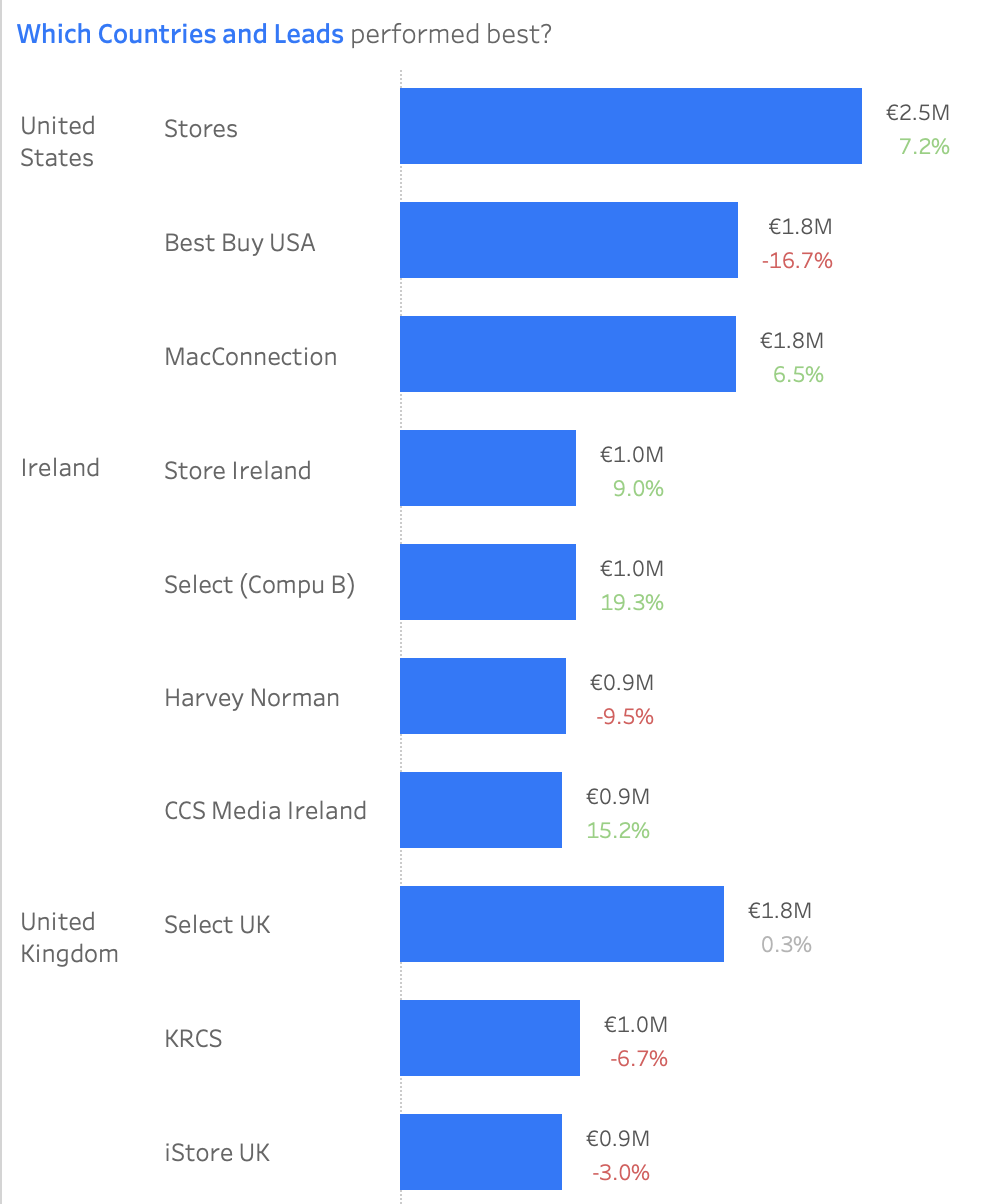
United States led with €6.2M in sales and US Stores leading with €2.5M in sales, while Netherlands grew 14%, and Canada declined by 12% since 2018/2019. Irish Store Select (Compu B) increased sales by 19.3%, which could be targeted for future sales leads.
Covid caused a -3.2% dip in 2020, followed by a +1.9% recovery in 2021, though sales hadn't fully rebounded.
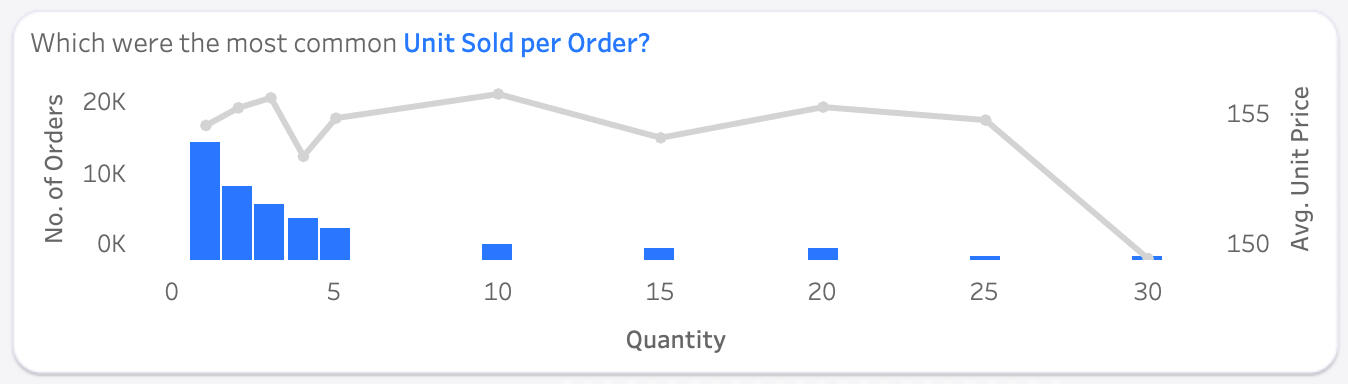
Customers tend to buy 1–5 products per transaction, but when making bulk purchases, they preferred 5, 10, 15, or even 30 items. This suggests an opportunity for special pricing on bulk purchases to encourage upselling.
December accounted for 77% of in-store sales, showing a strong opportunity for seasonal promotions. Shopping timing varied — females preferred Sundays and Mondays, while males leaned towards Thursdays for gift buying.
Two tabs answer the six questions. Slide between them — or tap either dashboard to zoom in.
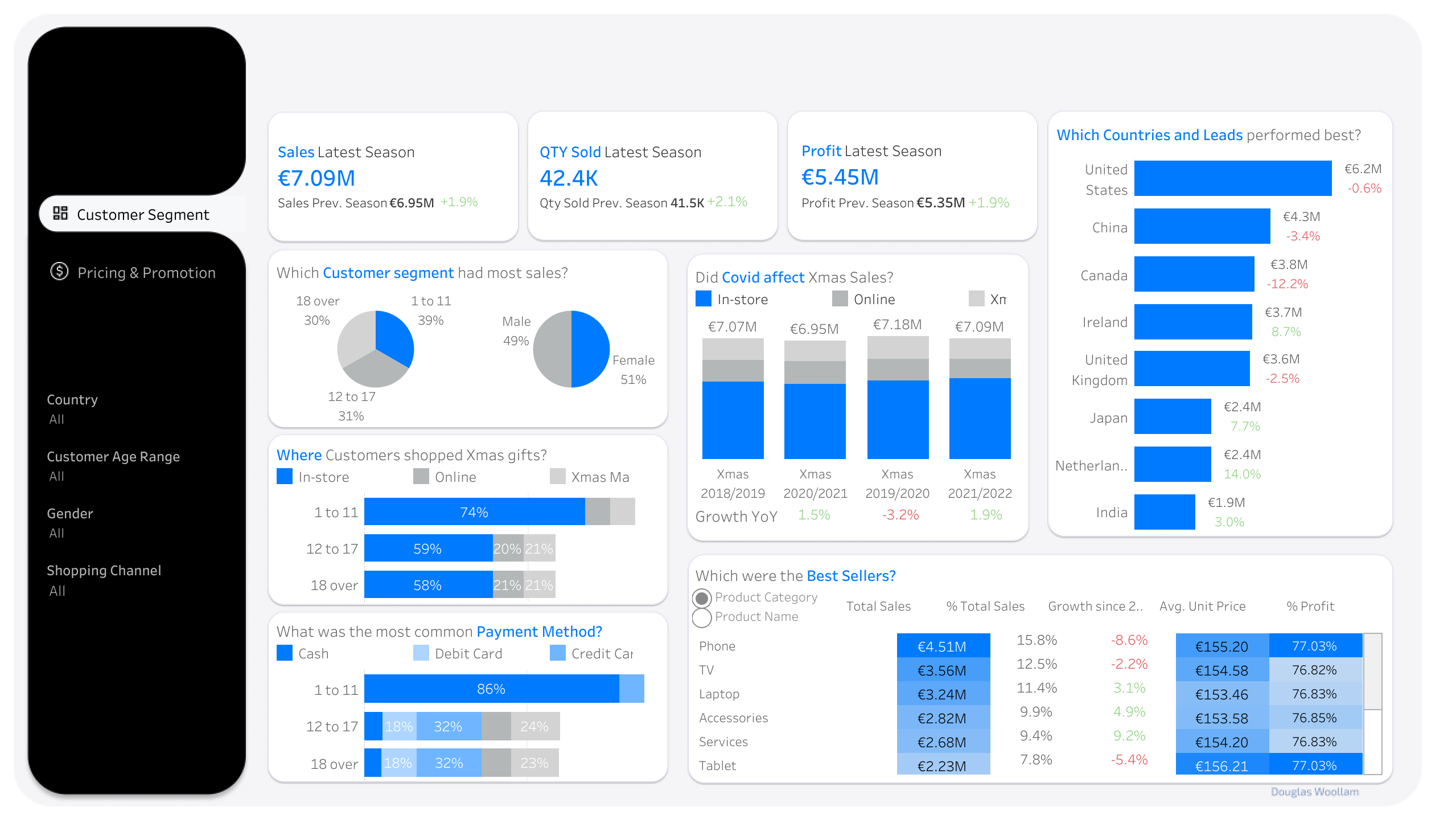
This tab helped answer the questions on Customer Segments, Best Performing Products, Geography, and Covid. It revealed that Children (ages 1–11) contributed nearly 40% of sales, highlighted the decline of top-performing products, mapped regional performance, and showed how sales dipped during the pandemic.
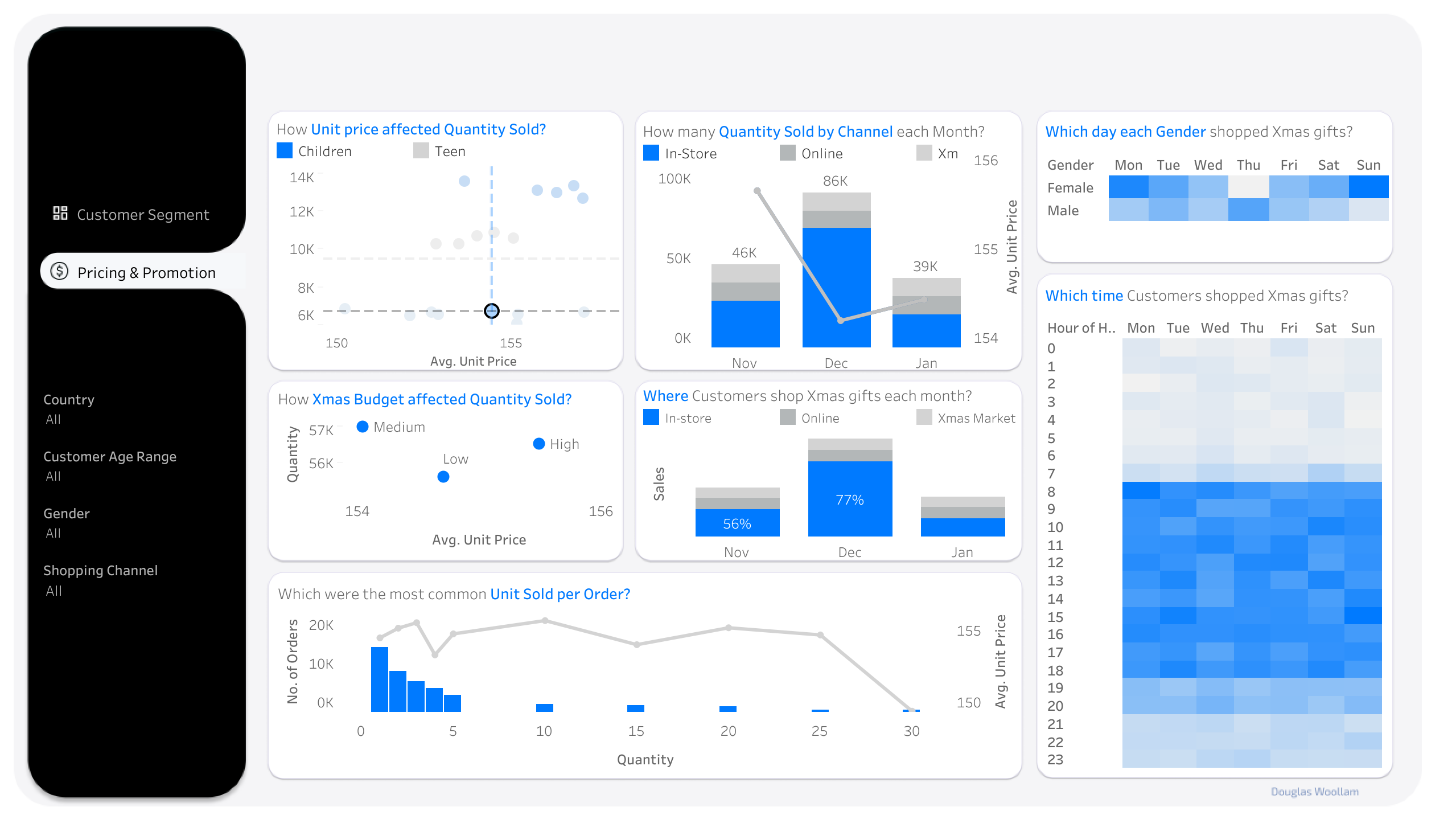
This tab helped answer the questions on Pricing and Shopping Timing. It analyzed how price variation affected sales, identified bulk promotion opportunities, and pinpointed December's 77% in-store sales share as the key window for promotions.
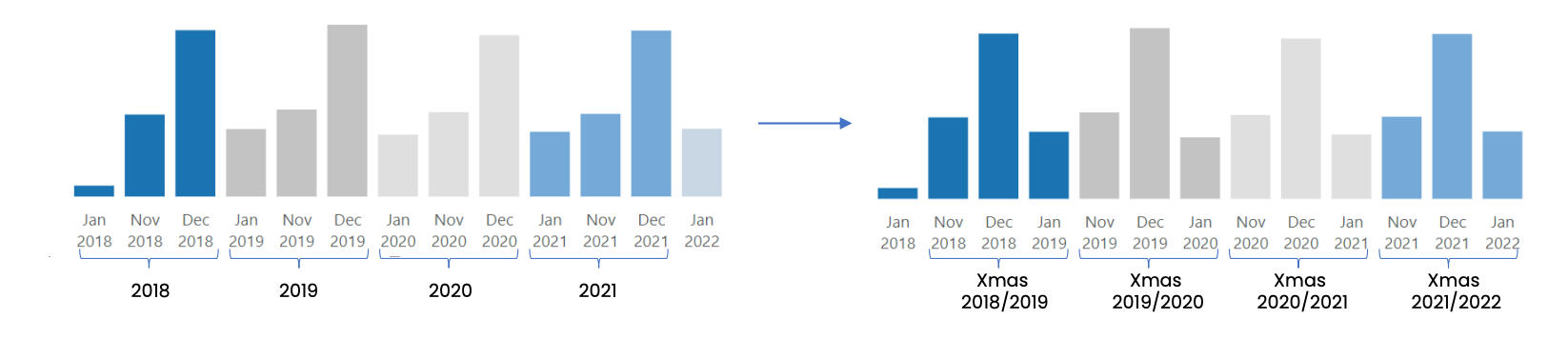
Instead of looking at the data by calendar year, data was grouped into Christmas Seasons to get a better understanding. For example, November 2018, December 2018, and January 2019 are combined into Xmas 2018/2019, considering these three months as one season for retailers and shoppers alike.
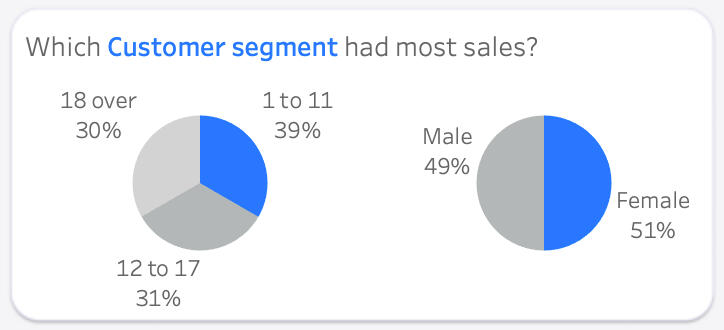
The Children segment (ages 1-11) stood out, contributing nearly 40% of total Christmas sales over the years. Interestingly, there was no significant difference between male and female customers across different age groups.
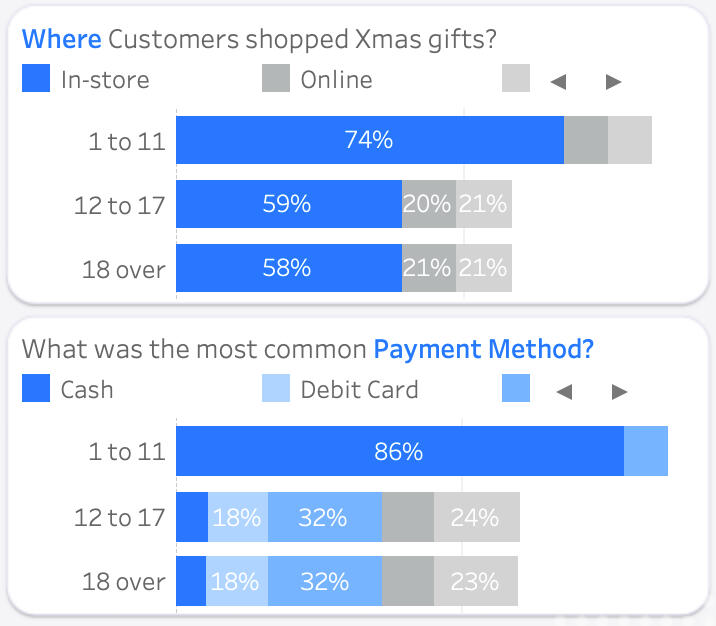
In-store shopping, particularly for the Children segment (74% in stores), was a prevalent choice. This is understandable as kids often prefer the hands-on experience of selecting gifts. Cash was the preferred payment method for Kid purchases, while Teens (ages 12–17) and Adults (ages 18 and over) leaned towards credit card, and cash was their least preferred payment method.
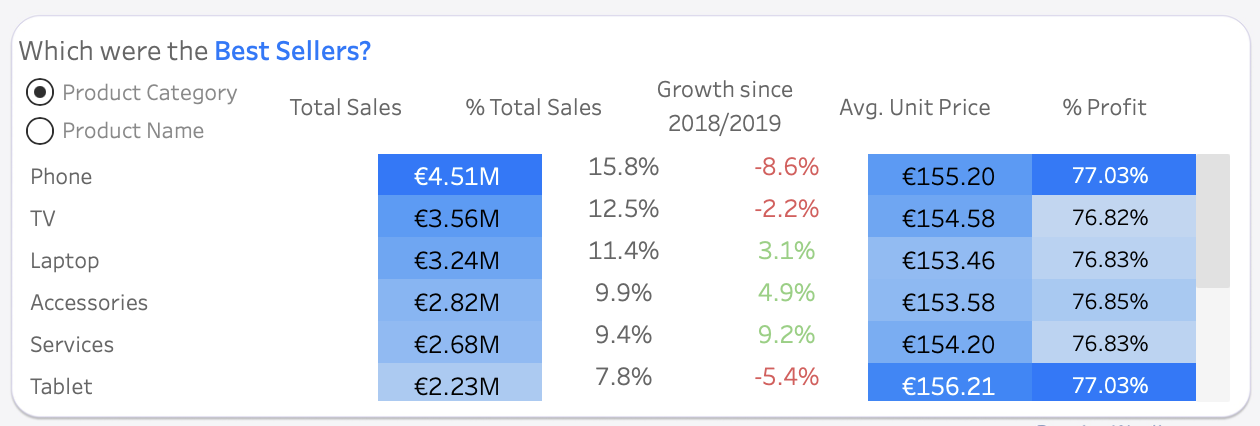
Overall, Phone and TV took the lead as the top-selling product categories, contributing a significant 27% to total sales among the 11 categories. While Phone stole the spotlight as the most beloved and profitable category with a staggering 77.03%, it's important to note that its sales had seen a notable decline in the past couple of years.
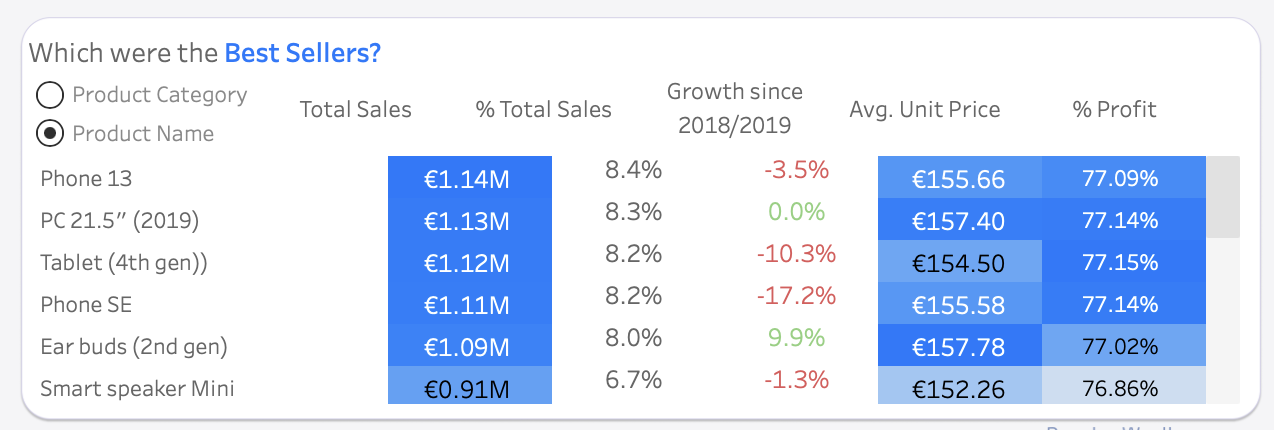
Breaking it down to the product level, Phone 13 and Phone SE were the best sellers, making up 8.4% and 8.2% of overall sales, respectively. Interestingly, the top 5 performers were all targeted at the Children segment. However, despite their initial popularity, all of these products saw a decline in sales, ranging from -2% to -15% over the past four seasons. Zooming in on the Teenager segment, Smart speaker Mini emerged as the most cherished Christmas gifts. Meanwhile, in the world of Adults, the Watch Series 5 stole the show, contributing the most to sales and enjoying a substantial sales growth of nearly 50% since the Christmas season of 2018/2019.
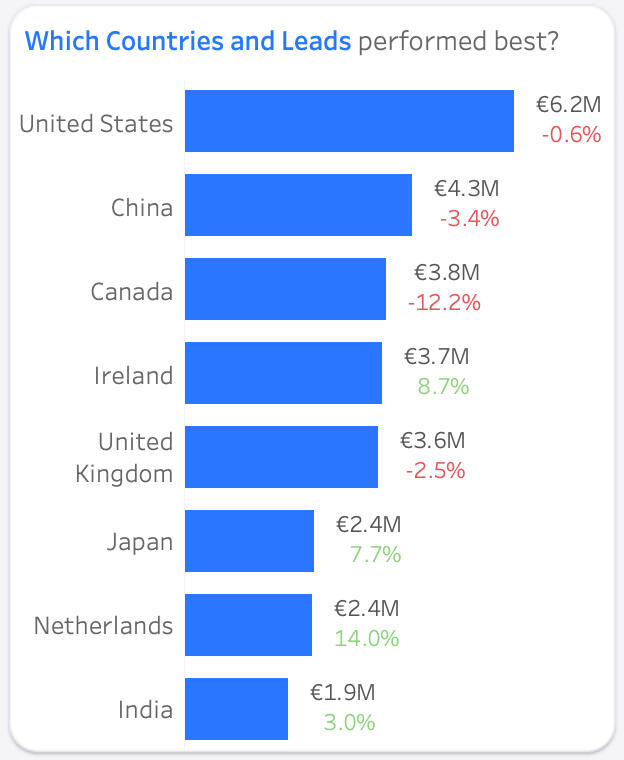
United States took the crown for the most Christmas sales over the four seasons, reaching €6.2 million. Canada, once the best in Xmas 2018/2019, faced a decline of -12% over the four seasons. The Netherlands showcased the most significant growth of 14%, climbing from the 7th to the 5th spot.
Drilling down to the Sales Leads, the three Stores in United States (Stores, Best Buy USA & MacConnection) emerged as the top-selling Stores, each generating over €1.8 million in sales. In Ireland, Store Ireland & Select (Compu B) emerged as the top-selling Stores, each generating over €0.9 million in sales.
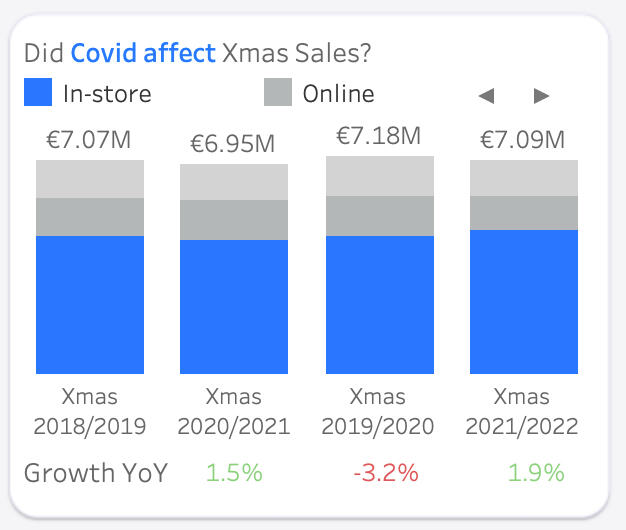
The Christmas gift market felt the impact of Covid in 2020, experiencing a -3.2% sales decrease. A recovery followed in 2021/2022 with a +1.9% increase, but the sales had not yet reached pre-Covid levels.
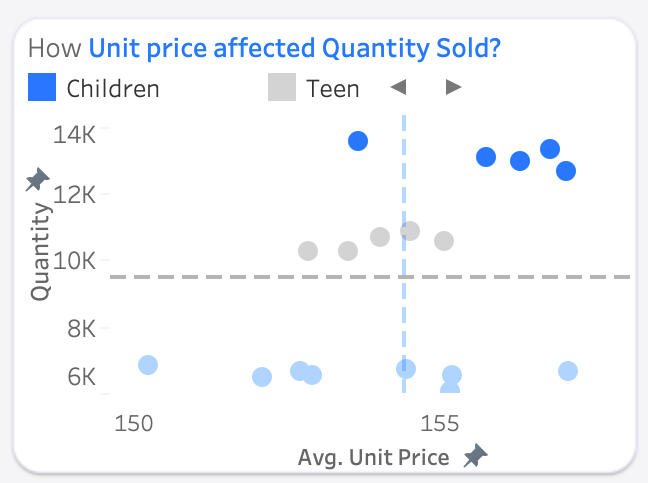
Despite higher prices, children's products lead in sales quantity, with over 12 thousand units sold for each product over the past four Christmas seasons. Among products for adults, unit price variation did not significantly affect the quantity sold (around 6–7 thousand units per product).
Customers tend to buy 1–5 products per transaction, but when making bulk purchases, they preferred 5, 10, 15, or even 30 items. This suggests an opportunity for special pricing on bulk purchases to encourage upselling.
December was the busiest month for Christmas gift shopping, with sales doubling compared to November and January. In-store shopping dominated December, accounting for 77% of sales, making it an excellent time for in-store promotions.
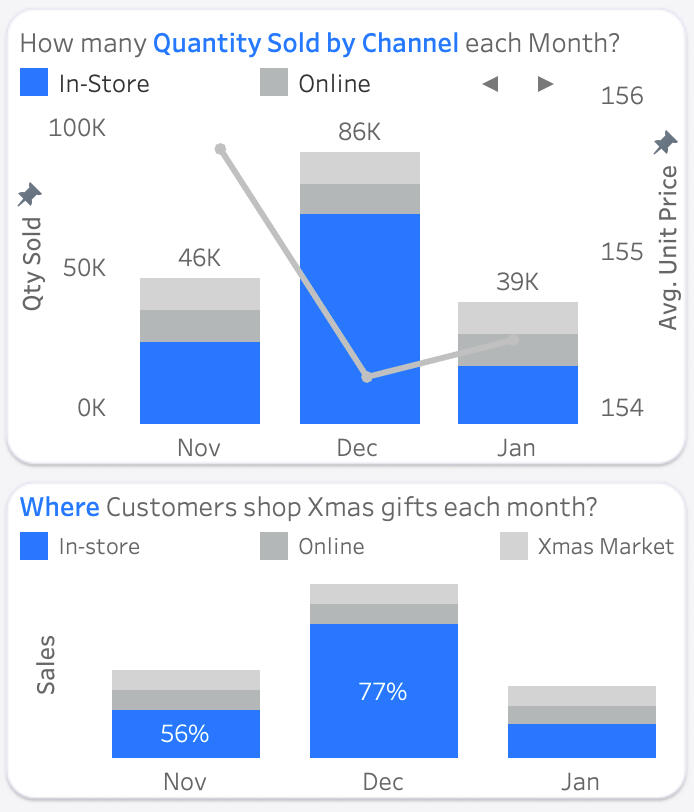
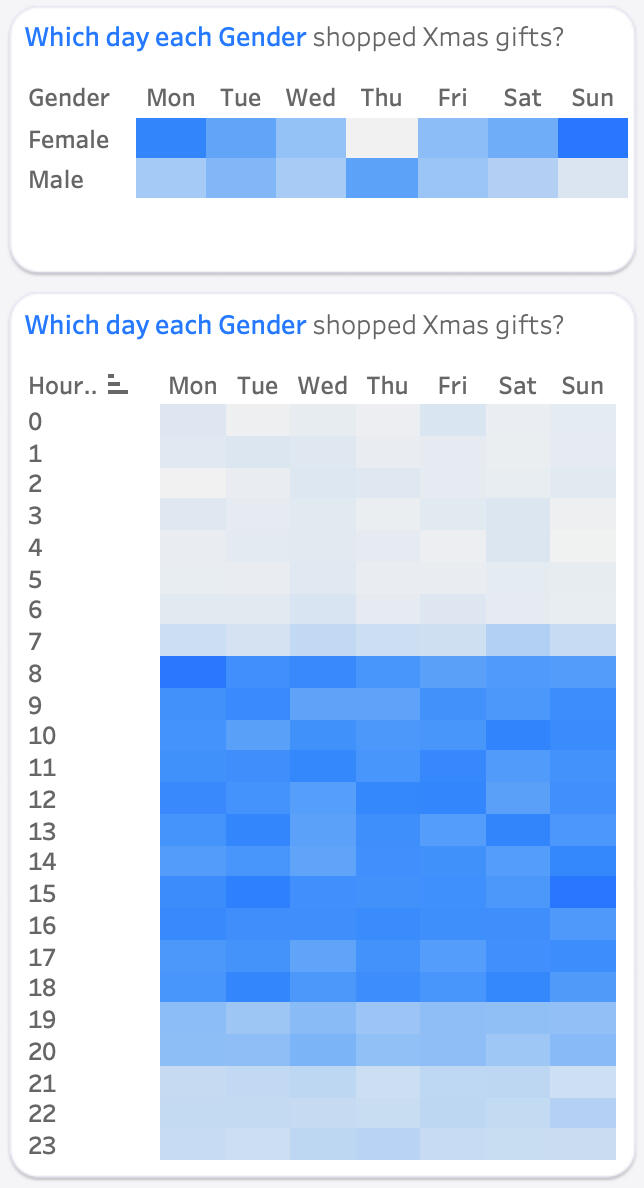
Shopping times varied across different channels. In-store shopping peaked on Monday, followed by Sunday. Sundays at 3 pm became the busiest time for Christmas markets. Online shopping provided flexibility, with peak times at Monday 8 am, Wednesday 11 pm, and Saturday 7 am. Weekday afternoons at 4 pm witnessed the highest online sales. While females preferred Sunday and Monday for Christmas shopping, males leaned towards Thursdays for their festive gift-buying spree.
Made for Mallow – Liscarroll Landscaping in my role as a Data Analyst. Recreated with artificial data.
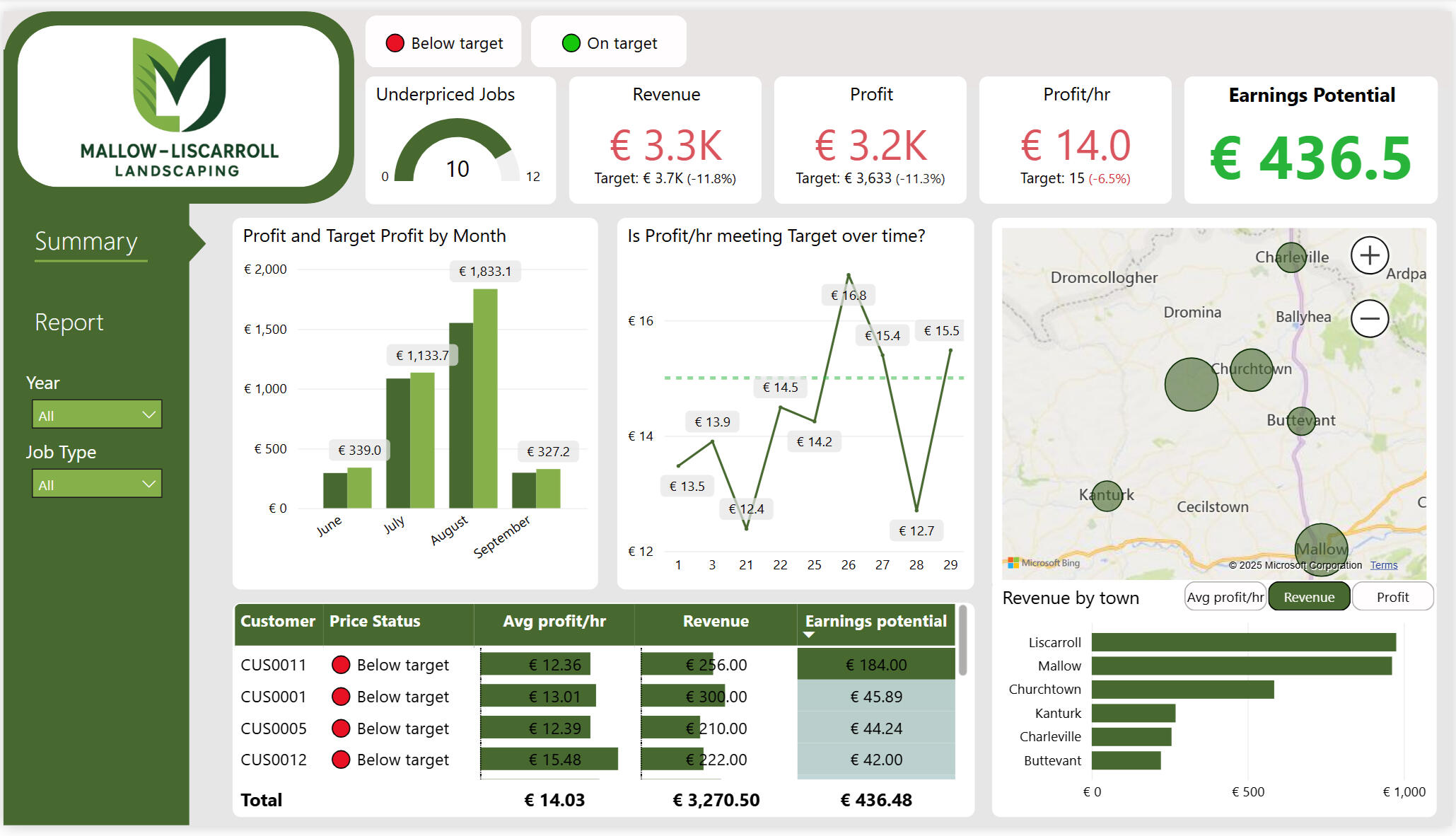
I built the BI stack for a landscaping business I co-founded — an SQL script and Power BI report that replaced manual processes. It increased profit by 20%, identified high-value towns to focus marketing and service checkups on, and saved 1.5 hours of reporting time every week.
Enhanced decision-making with DAX measures that blend distance, fuel price, rental gear and crew size into margin KPIs; visuals let the business slice profit by customer, townland, week or service at will.
Increased gross profit by 20% by developing DAX-based metrics for cost and profitability in a Power BI dashboard, identifying underpriced jobs, and presenting data-backed pricing recommendations to the business owner that included overlooked costs like fuel, distance and differing equipment.
Achieved an 85% repeat booking rate by tracking job frequency in Excel, automating maintenance reminders in Python, and optimising schedules to group nearby clients in Power BI, boosting recurring revenue, client satisfaction, and operational efficiency.
Enabled prioritisation of high-margin, efficiently scheduled jobs and reduced prep time by developing DAX-based KPIs in Power BI that provided cost breakdowns per job by time, location, proximity, and resource costs, improving decision-making and auto-generating daily equipment lists.
Cut weekly reporting time by 75% from 2 hours to 30 minutes by creating a user-friendly Excel workbook, automating the pipeline to the Power BI dashboard and ensuring smooth adoption with a comprehensive user guide and video walkthrough.
A single pipeline moves the data from a spreadsheet all the way through to an interactive report.
My Python code converted individual Excel pages into individual CSV files, ready to import into the Postgres SQL server.
# execute py file in jupyter_venv
from pathlib import Path
import pandas as pd

# path to the workbook
wb = Path('Mallow - Liscarroll Landscaping/landscaping_schema.xlsx')

# check the file exists before proceeding
if not wb.exists():
    raise FileNotFoundError(wb)

# iterate through every sheet
for sheet in pd.ExcelFile(wb).sheet_names:
    df = pd.read_excel(wb, sheet_name=sheet, engine="openpyxl")
    csv_path = wb.parent / f"{sheet.lower()}.csv"
    df.to_csv(csv_path, index=False)
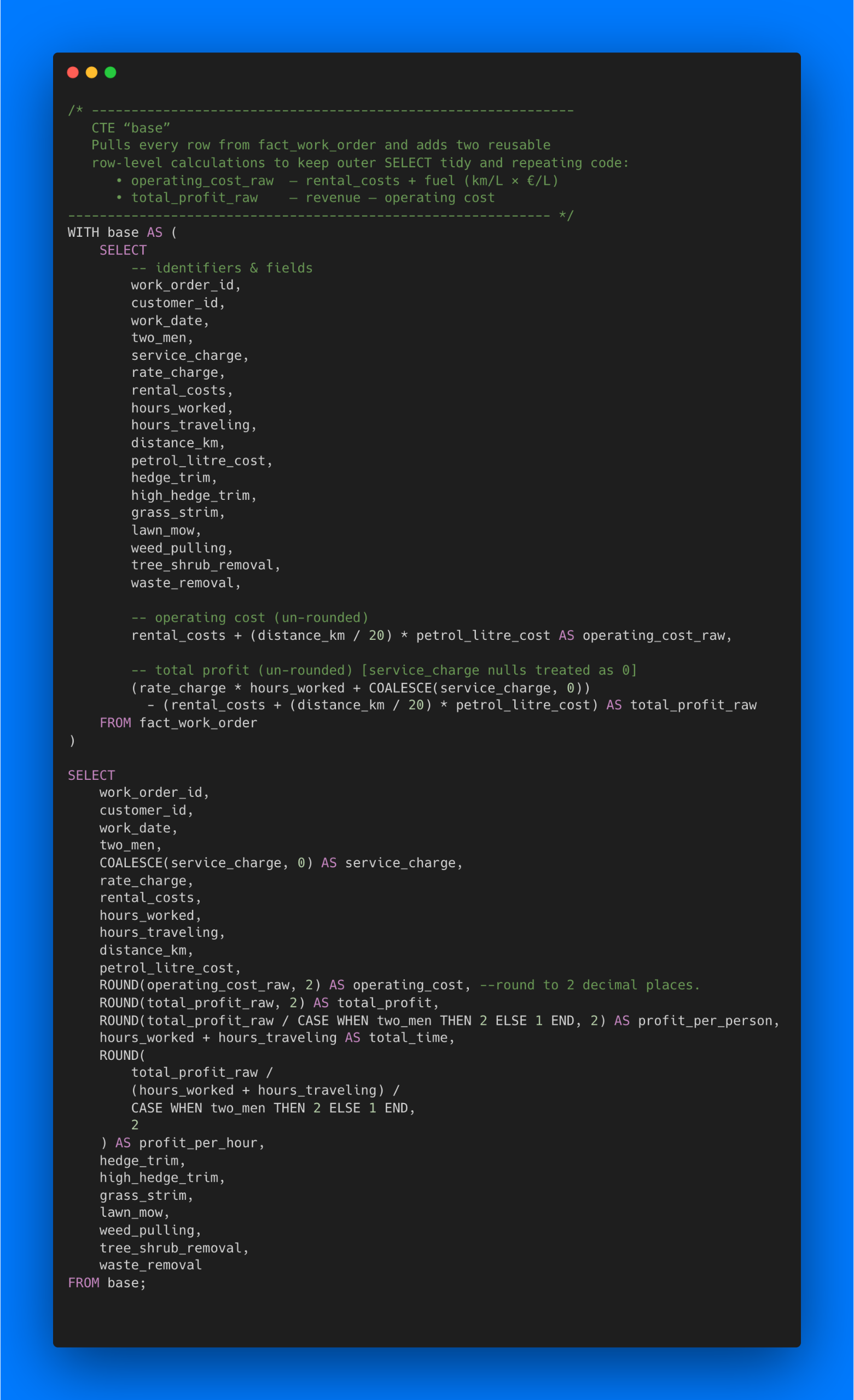
print("Exported", csv_path)170-line SQL script used to build tables from the CSV files. Defines keys and data types, NULL / empty value handling. CTE for dashboard metrics.
Below is the base CTE on fact_work_order, normalises service_charge nulls to 0, rounds to two decimals, and outputs dashboard metrics: operating_cost, total_profit, profit_per_person, total_time, and profit_per_hour
Two tabs make up the report. Slide between them — or tap either dashboard to zoom in.
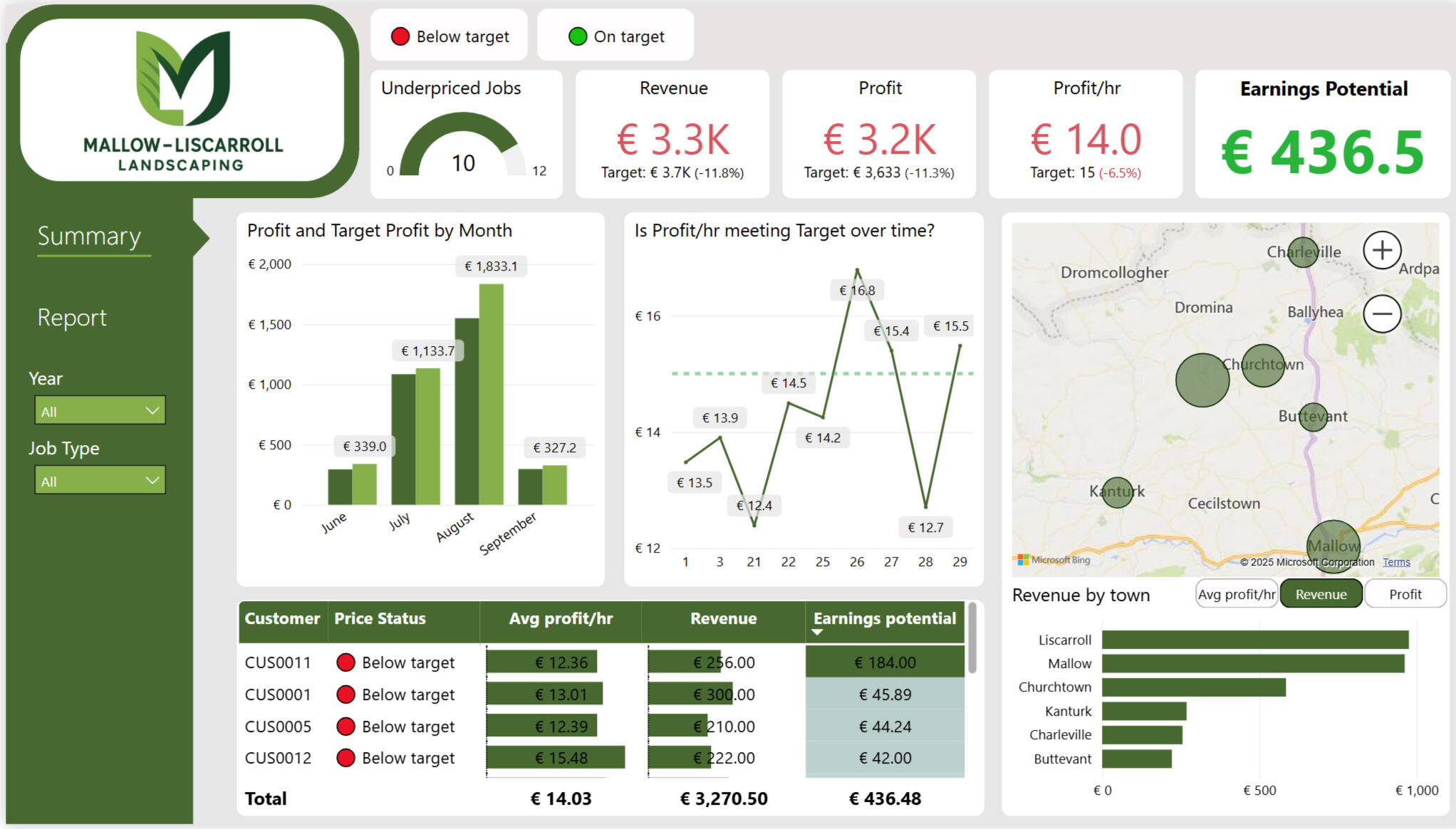
Includes slicers for below / on-target jobs, year and job type. The map and revenue-by-town bar chart use a field parameter to toggle between revenue, profit or profit/hr for flagging high-value towns. The column and line charts can be drilled up or down for time-series analysis.
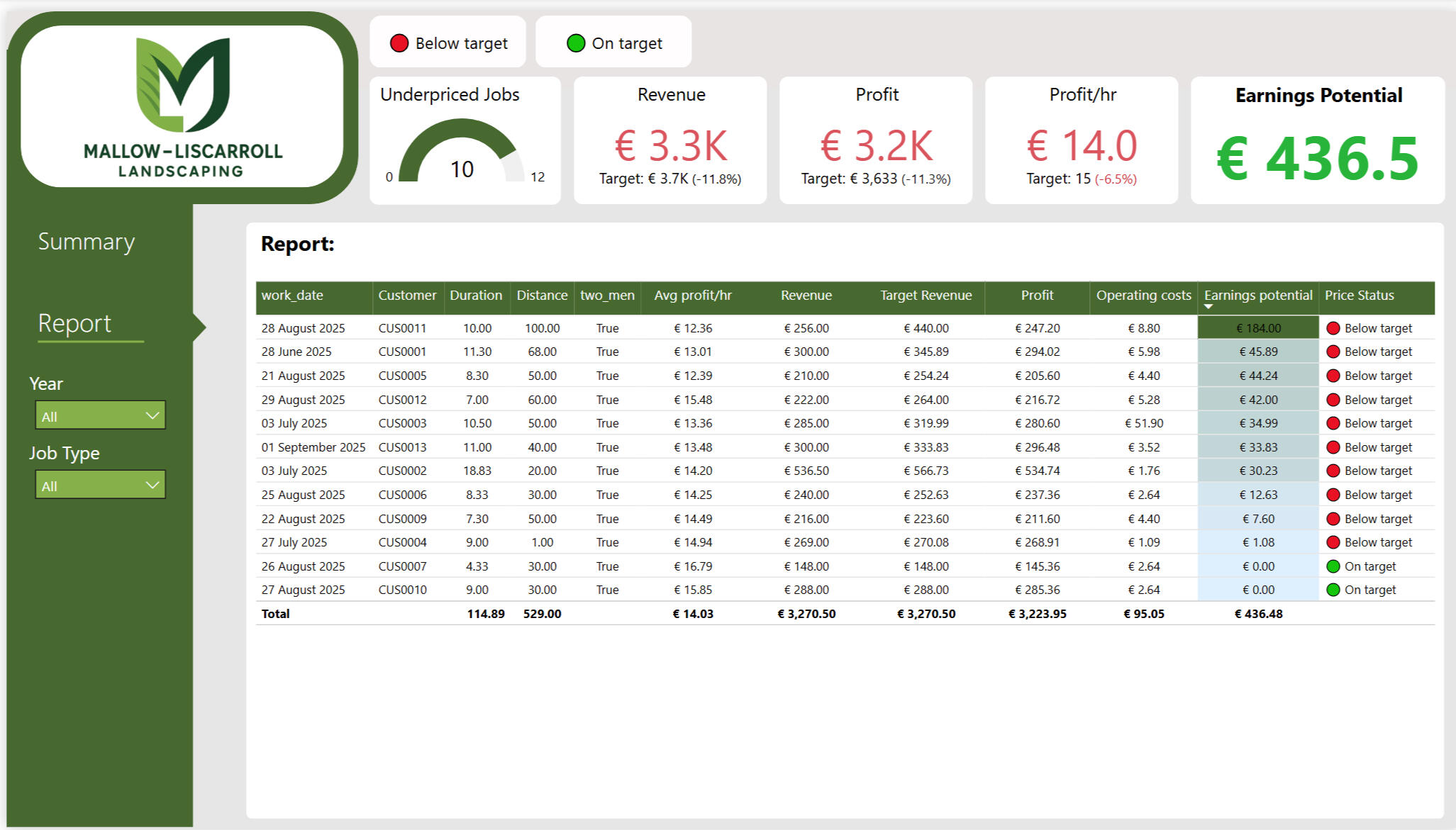
Presents a job-level table with key metrics: work date, customer, duration, distance, crew size, revenue, profit, profit per hour, operating costs, target revenue, earnings potential and price status. All slicers are synced with the summary page.
18 DAX measures were created across both tabs of the dashboard. Here are three of the core ones.
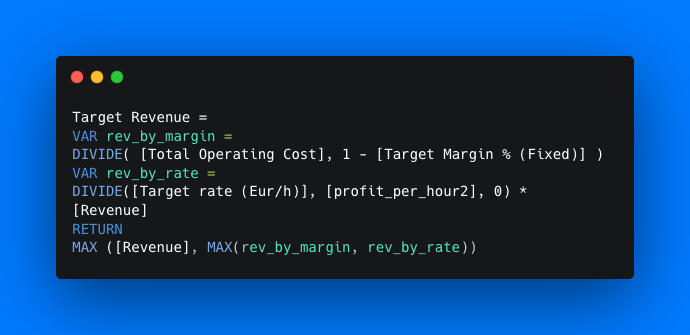
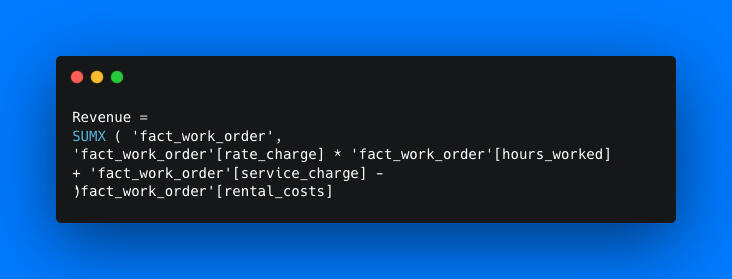
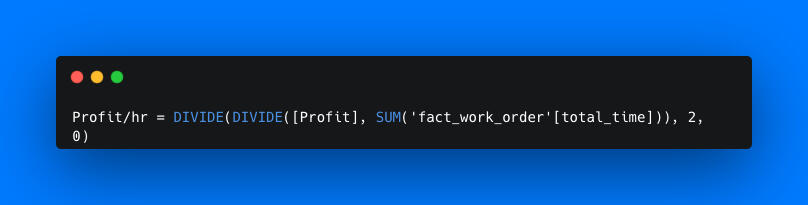
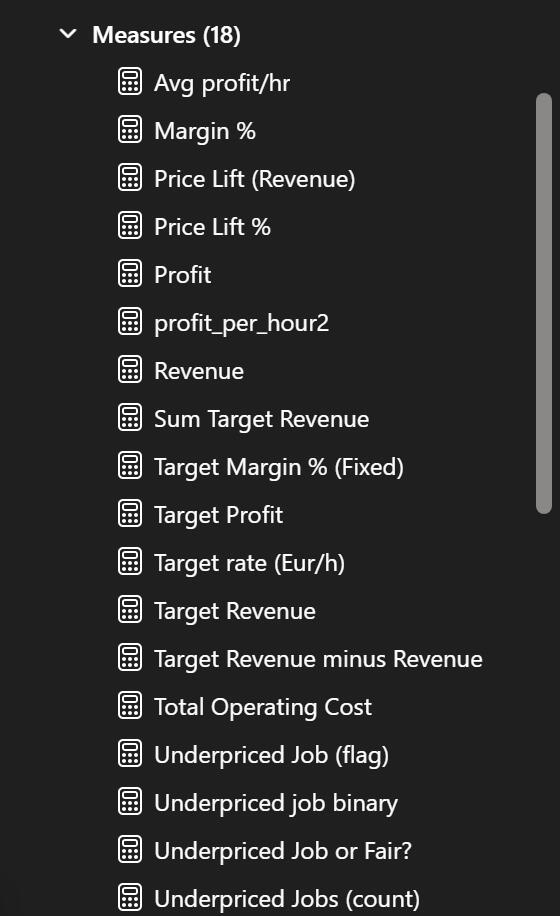
Overall, this project demonstrates how a data pipeline built with Microsoft Excel → Python → SQL → Power BI can transform raw operational data into actionable insights that increase profit, identify high-value clients, and support smarter business decisions.
Built for Cork AI Consulting to show how we report web and campaign performance. Created with example data.

Hover, filter and switch tabs.
Most owners we meet have Google Analytics switched on and never open it. The numbers are there, but nothing in the interface tells them whether last month was good. So we built the report we would hand a client: one screen, four KPIs, every number compared to the month before, and a second tab that ranks the sources sending the traffic. It runs on example web-analytics data, so the figures below describe the demo, not a real client.
Here are the takeaways from the demo data
Better on all four headline KPIs: 20,031 sessions (+29.9%), session duration up to 1 min 8 s (+17.2%), time on page +4.4% and unique pageviews per session +10.3%. More visitors and more engaged visitors, not one at the cost of the other.
Organic search carried 45% of sessions and direct another 24%, while paid search bought 6% and display returned nine sessions in the month. Referral sends the least traffic but the most engaged, at 2.4 pageviews a session.
No. Desktop is 77.3% of sessions at an 18% bounce rate; mobile is 20.3% and bounces at 27%. Mobile is also the fastest-growing slice, so the gap costs more every month it stays open.
Six referrers account for 19,885 sessions, and the top two — google.com.br at 44% and indiegogo.com at 24% — account for two-thirds on their own. The sparkline beside each one separates a steady stream from a single spike: cnet.com jumped 118.8% off a small base.
Traffic and attention do not line up. The busiest page holds a reader 22 seconds; the second-busiest holds them one second and bounces 29% of them. Two quieter pages hold visitors 36–40 seconds — the ones worth sending more traffic to.
Two tabs, built to be read in order. Slide between them — or tap either dashboard to zoom in.

The month on one screen. Four KPI cards across the top, then the five questions underneath: devices, referral sites, geography, channels and pages. Clicking the map filters the whole tab to one country.

The same four KPIs, each given a row: a 12-month trend with the average marked, and the top five source mediums ranked, with a reference line showing where each sat the month before.
Every number on the dashboard is a comparison, not a total. The header states the pair in plain English — showing results for Jan 2019 compared to Dec 2018 — and every KPI, bar and table inherits it, so nothing on the page can be read out of context.
Sessions reached 20,031, up 29.9% on the prior month, and the engagement measures rose with them: session duration +17.2%, time on page +4.4% and unique pageviews per session +10.3%. That combination matters. A traffic spike on its own usually means the new visitors are the wrong ones and every engagement metric sags; here they moved together, which points at better-qualified traffic rather than more of it.
Organic search brought 9,078 sessions (45%) and direct another 4,824 (24%) — nearly seven in ten visits arriving without being paid for. Paid search accounted for 6% and display for nine sessions in the whole month, which is the kind of line that ends a spend rather than starts an optimisation. Referral is the interesting one: the smallest of the meaningful channels at 10%, but the highest quality, at 2.4 unique pageviews a session against organic's 1.9 and direct's 1.4.
Desktop holds 77.3% of sessions and bounces at 18%. Mobile holds 20.3% and bounces at 27% — half again as often. Mobile sessions grew 12.3% in the month, so the weaker experience is the one gaining share. On a real site this is the first thing we would act on, because it is a fix to the site rather than a fix to the marketing.
Six referrers account for 19,885 sessions, and the top two carry two-thirds of them: google.com.br at 8,817 (44%) and indiegogo.com at 4,824 (24%). The sparkline beside each source is there to answer the follow-up question a total cannot — is this a stream or a spike? cnet.com grew 118.8%, but from a base of a few hundred sessions, and its shape says campaign rather than habit. The Brazilian search traffic is the opposite: large, flat and dependable, and worth a look at whether the site actually speaks to those visitors.
Ranking pages by sessions alone hides the problem, so each row carries time on page and bounce rate beside the count. The top page takes 3,441 sessions and holds them 22 seconds at a 16% bounce. The second takes 1,665 and holds them one second, bouncing 29% — a page getting traffic it does nothing with. Further down, two pages hold visitors 36 and 40 seconds on a fraction of the traffic. Those are the pages to point the marketing at.
The point of a report like this is not the charts — it is that an owner can open it on a Monday morning and, inside a minute, know whether the month was good, which channel earned the credit and which page is wasting the traffic it gets. That is the standard we build client reporting to, whether it lands in Tableau, Power BI or a weekly email.